Internal Wiki Best Practices: Build a Knowledge Base Your Team Actually Uses

An employee needs the reason behind a product decision. The answer exists, but it is buried in an old meeting note. A new hire asks how a process works, and three colleagues provide slightly different explanations. The company has plenty of documentation; what it lacks is a dependable way to connect and reuse that knowledge.
That is the problem an internal wiki should solve. A useful wiki is not simply a collection of polished articles. It captures everyday work, helps people find related context, and makes corrections easy. These internal wiki best practices offer a practical way to build that habit, using Cosense (formerly Scrapbox) as an example of a connected, collaborative knowledge base.
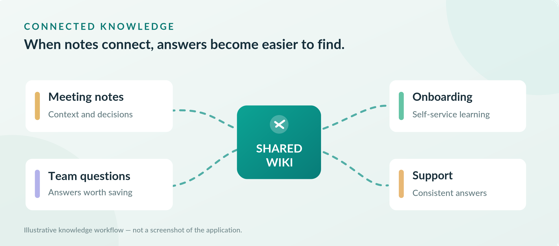
Illustration: working notes become reusable knowledge when pages are connected.
Begin with repeated questions, not a complicated structure
Before choosing categories, ask where colleagues already lose time. Which questions appear repeatedly in team chat? Which procedures depend on one experienced person? Where do decisions become difficult to reconstruct? A team knowledge base is most valuable when its first pages answer questions people actually ask.
Choose one workflow for a pilot: employee onboarding, customer support, or meeting decisions. Gather a small set of recurring questions and the best available answers. Include the rationale behind each answer, not just the final instruction. Avoid copying an entire archive into a new workspace before anyone has shown they need it.
At SORACOM, a 2018 interview described an earlier wiki that employees seldom updated. The company reported broader use of Scrapbox to share meeting minutes, event notes, and customer examples across departments. Read the SORACOM customer story.
Cosense supports quick outlines, search, and real-time collaborative editing. That makes it possible to start with working notes and improve them with colleagues rather than delaying publication until every page looks like a finished manual. See Editing basics and Cosense features.
See also: Top Los Angeles Travel Attractions Tourists Love
Name pages the way people search
Good titles are part of knowledge management. A vague heading might make sense to the person who wrote it, but it is unlikely to match the words a new colleague uses when searching.
A historical example comes from freee’s customer support operation. In a 2019 interview, staff described using the customer’s original question as a page title, then adding the answer. This helped colleagues search using the same wording they heard from customers. The team also adopted simple naming and writing conventions so many people could contribute without a single administrator having to rewrite everything. Read the freee customer story.
Apply the principle to internal pages: use recognizable questions or task names, provide the answer near the top, and add enough background to explain exceptions. When a question changes, revise the existing answer rather than allowing contradictory copies to multiply.
Connect information to the work that produced it
Folders tell readers where someone filed a document. Links can tell them why that document matters. A meeting decision may explain a support policy; the support policy may point to a product limitation; a development note may explain how that limitation was resolved.
In Cosense, placing an actual page title inside square brackets creates a link. The destination shows a backlink to the source page, and two-hop links reveal pages connected through a shared neighbor. These are documented behaviors, not a substitute for thoughtful page naming. The linking guide and two-hop link guide explain the mechanics.
Use links when they add context. Connect a decision to the meeting where it was made and to the procedure it changed. Connect an onboarding explanation to the deeper technical or operational reference. Readers should be able to follow a trail of reasoning without knowing which department originally wrote the information.
Turn meeting notes into reusable decisions
Meeting notes often record what people said but leave the next reader wondering what happened. A useful record distinguishes the question being considered, the decision reached, the reason for it, and the next action.
FiNC’s technology team described a more active approach in a 2018 interview. Team members prepared meeting agendas in Scrapbox, added comments before discussions, and sometimes reached conclusions that made a scheduled meeting unnecessary. Their account illustrates how shared notes can support a decision while it is being formed, rather than becoming an archive afterward. See the FiNC customer story.
For each meaningful decision, record its date, context, outcome, responsible person, and unresolved questions. Link the page to relevant work. If the decision changes, update the current guidance and preserve enough history for a future teammate to understand the change.
Give new employees a route through existing knowledge
Employee onboarding documentation is easiest to use when it moves from immediate tasks to deeper context. A new colleague first needs access instructions, a list of key contacts, and the steps for recurring work. Later, they need the reasoning behind team conventions and previous decisions.
At LoiLo, a 2018 interview described the team first using Scrapbox to share know-how for new employees. Over time, engineers also added investigations and work notes, making previously personal expertise accessible to colleagues. The lesson is not to create a separate onboarding encyclopedia: connect introductory material to the actual work being documented. Read the LoiLo customer story.
An effective onboarding path might begin with the tasks of the first week, then point to the policies, project decisions, and troubleshooting notes behind those tasks. Ask each new hire which answer was hard to find, and improve that page while the confusion is fresh.
Keep contribution easy and accuracy visible
A collaborative knowledge base needs two complementary habits: writing without unnecessary friction and checking information that could mislead someone. If every observation requires formal approval, useful context stays in private messages. If nobody maintains important instructions, employees stop trusting the wiki.
Give people permission to capture working notes, questions, and lessons learned. For higher-stakes guidance, identify a human owner and a review cadence. Make it clear when a page is exploratory, when an answer is confirmed, and when it needs checking. These are editorial practices a team can establish; they should not be mistaken for automatic Cosense approval workflows.
Cosense offers private and public projects and project-level access controls. Review who can access a project before adding sensitive material. A public page is not automatically editable by every visitor. See Cosense help on public projects.
Test the workflow for thirty days
A focused rollout gives the team evidence about what works before expanding to more departments.
Illustration: a four-week pilot for building a sustainable internal wiki.
| PHASE | ACTION |
| Week 1 | Select one team, identify recurring questions, and create a small collection of useful pages. Agree on basic title conventions and appropriate project access. |
| Week 2 | Add live meeting notes and real support or onboarding questions. Link each new page to existing relevant information. |
| Week 3 | Ask colleagues to search the wiki before repeating an answer. Invite them to correct confusing pages and flag missing context. |
| Week 4 | Review outdated answers, duplicate pages, and unanswered searches reported by team members. Decide which practices should become routine. |
Cosense’s support and guides include project examples and team learning resources that can help with an introduction. Keep the rollout simple enough that the knowledge base grows through normal work rather than a parallel documentation campaign.
Measure usefulness, not just page count
The number of pages written is a weak measure of whether anyone benefits. Instead, ask practical questions. Can a new hire find a frequent answer without interrupting a colleague? Can a support specialist locate the latest guidance? Can a teammate trace a decision back to its context? Are outdated instructions identified and corrected?
Review these questions after the pilot and record the answers manually if necessary. Do not assume the software provides a particular analytics dashboard. A small collection of accurate, connected pages may be more valuable than a large archive that nobody trusts.
Make knowledge sharing part of the job
The most durable internal wiki best practices are behavioral: write down useful discoveries when they happen, title pages in language readers recognize, connect related work, and maintain answers that people rely on. Tools can make those habits easier, but cannot replace them.
Start with one recurring question, document a reliable answer, and link it to the work that explains it. Then invite the next person who uses the page to improve it. That is how an internal wiki begins to function as shared organizational knowledge rather than another place to store files.